
Dynamic access control is defined as a security model that evaluates every access request in real time, adjusting permissions based on contextual signals such as device posture, user location, and session risk. Unlike static role assignments, it adapts access decisions continuously throughout a user session. The NIST Cybersecurity Framework 2.0 under control PR.AC-4 mandates that access permissions be risk-based and dynamically enforced, making this approach a compliance requirement rather than an optional upgrade. For Indian enterprises managing hybrid Active Directory and cloud environments, the shift from static role-based models to context-aware security is now a measurable operational priority.
What does dynamic access control actually do?
Dynamic access control (DAC) grants, denies, or restricts access based on real-time environmental variables rather than a fixed role assignment. Those variables include device trust scores, network location, time of day, and session behaviour. The result is a system that responds to changing conditions mid-session, not just at login.

The most advanced implementation of this model is Risk-Adaptive Dynamic Access Control, known as RADAC. RADAC automates security responses by applying minimum and maximum risk threshold scores to contextual signals, adjusting access without requiring manual policy changes. A user accessing a payroll system from an unmanaged device in an unfamiliar city would trigger a higher risk score, prompting the system to step up authentication or restrict access automatically.
Windows dynamic access control, available in Windows Server environments, extends this concept to file and folder permissions through claims-based access. It uses user and device claims stored in Active Directory to enforce granular file access policies. This makes it a practical entry point for organisations already running Microsoft infrastructure.
What prerequisites do you need before deploying DAC?
Successful deployment requires a clear baseline of your existing identity and access management (IAM) architecture. Without that baseline, policy conflicts and misconfiguration gaps are almost inevitable. Governance ensures policy alignment with compliance requirements and prevents security gaps from forming during rollout.
The data inputs that feed DAC decisions must be reliable and continuously updated. These include user attributes from Active Directory or an LDAP directory, device posture scores from endpoint management tools, location data, and session risk metrics. Stale or incomplete attribute data produces inaccurate access decisions, which is a common failure point in early deployments.
The table below outlines the core prerequisites across three categories.
| Category | Prerequisite | Purpose |
|---|---|---|
| Technology | Attribute-Based Access Control (ABAC) system | Evaluates user and device attributes for policy decisions |
| Technology | Security Information and Event Management (SIEM) | Feeds real-time risk signals into access policies |
| Technology | Privileged Access Management (PAM) | Controls and monitors high-risk access paths |
| Organisational policy | Governance framework aligned to compliance | Prevents policy drift and maintains audit readiness |
| Data sources | User attributes, device posture, location, session metrics | Provides the contextual inputs that drive dynamic decisions |
Integrating DAC with existing SIEM platforms is particularly important for Indian enterprises subject to CERT-In incident reporting obligations. SIEM feeds provide the real-time risk signals that make adaptive policies accurate rather than arbitrary.
How to implement dynamic access control step by step
A phased approach reduces risk and makes the deployment auditable at each stage.
-
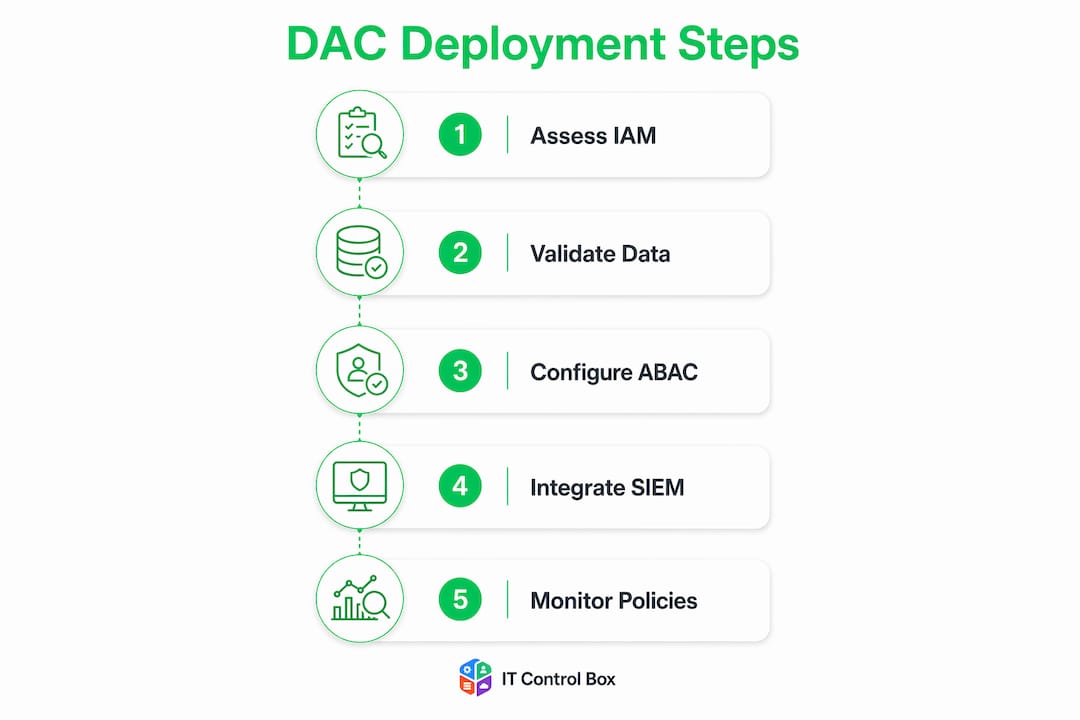
Assess your current environment. Map all existing RBAC roles, group policies, and IAM integrations. Identify which resources carry the highest risk and which user populations access them. This assessment forms the baseline against which DAC policies are measured.
-
Define dynamic attributes and risk thresholds. Decide which contextual signals will influence access decisions. Common attributes include device compliance status, user department, location, and time of access. Set minimum and maximum RADAC threshold scores for each policy.
-
Integrate DAC with your existing RBAC foundation. RBAC provides the stable baseline for broad access management. DAC layers contextual guards on top of that foundation. Replacing RBAC entirely with dynamic policies creates unnecessary complexity and increases the risk of shadow access.
-
Configure continuous session re-evaluation. Zero Trust security demands continuous verification throughout the user session, not just at the point of authentication. Configure your policies to re-evaluate contextual attributes at defined intervals or when a risk signal changes, such as a device falling out of compliance mid-session.
-
Test policies in audit mode before enforcement. Run new policies in a logging-only mode to observe their effect without blocking legitimate access. Review the audit logs against expected outcomes and refine thresholds before switching to enforcement mode.
-
Deploy to production and monitor continuously. After enforcement mode is active, monitor policy trigger rates and false positive rates weekly. High false positive rates indicate thresholds are set too aggressively and will degrade user experience.
Pro Tip: Start with Just-In-Time (JIT) access policies for privileged accounts before rolling out DAC to the broader user population. JIT is a contained, high-value use case that builds team confidence and produces clear audit evidence before you scale.
DAC vs RBAC: how do these access models compare?
The terminology around access control models creates genuine confusion. Two entirely different models share the abbreviation "DAC." Confusion between dynamic and discretionary access control leads to deployment errors and audit failures, so the distinction deserves direct attention.
Discretionary Access Control (legacy DAC) is a user-owner model where the resource owner decides who can access a file or object. It is common in legacy Windows file systems and gives individual users significant control. Dynamic Access Control, by contrast, is a system-enforced model that removes individual discretion and replaces it with automated, policy-driven decisions based on real-time context.
Role-Based Access Control (RBAC) assigns permissions to roles, and users inherit those permissions by virtue of their role membership. It is predictable and easy to audit, but it is static. A user retains the same access whether they are working from a trusted corporate device in a Mumbai office or from a personal laptop in an unknown location. Dynamic access control closes that gap by adding contextual guards that RBAC cannot provide on its own.
| Model | Decision basis | Flexibility | Audit complexity |
|---|---|---|---|
| RBAC | Role membership | Low | Low |
| Discretionary (legacy DAC) | Resource owner discretion | High | High |
| Dynamic access control | Real-time context and risk scores | High | Medium (with governance) |
| ABAC | User and resource attributes | Very high | Medium |
Security architects recommend combining RBAC with DAC to balance operational stability with contextual flexibility. RBAC prevents role explosion; DAC prevents privilege abuse in high-risk scenarios.
Pro Tip: When mapping your access model strategy, treat RBAC as the floor and dynamic policies as the ceiling. Users get the minimum access their role requires, and dynamic policies raise or lower that ceiling based on real-time risk.
What are the common challenges in operating dynamic access control?
Policy drift is the most persistent operational risk. Uncontrolled dynamic rule growth creates shadow access and makes compliance audits significantly harder. Each new dynamic rule added without a corresponding review process increases the attack surface rather than reducing it.
Continuous attribute validation is equally demanding. If the device posture data feeding your policies is 24 hours old, your real-time access decisions are not actually real-time. Attribute freshness requires ongoing investment in endpoint management and directory synchronisation.
Best practices for operating DAC at scale:
- Restrict dynamic policies to high-risk workflows. Use them as a controlled mechanism for privileged access, sensitive data repositories, and external contractor accounts rather than applying them universally.
- Maintain a policy register. Document every dynamic rule, its business justification, its owner, and its review date. Treat this register as a living compliance document.
- Automate audit trail capture. DAC enhances compliance by enforcing least privilege dynamically, but only if audit logs are complete and tamper-evident.
- Set false positive thresholds. Define an acceptable rate of legitimate access blocks per week. Exceeding that threshold triggers a policy review.
- Review policies quarterly. Business structures change, and access policies must reflect current organisational reality.
Treating dynamic access control as a one-time login gate is the single most common implementation failure. Continuous re-evaluation of contextual attributes during active sessions is what separates a genuine Zero Trust posture from a compliance checkbox. If your DAC policies only fire at authentication, you have a sophisticated front door with no locks on the windows.
Key takeaways
Dynamic access control delivers its full security value only when it combines continuous session re-evaluation, a stable RBAC foundation, and disciplined policy governance.
| Point | Details |
|---|---|
| Real-time evaluation is the core | DAC adjusts permissions based on device posture, location, and session risk throughout the session. |
| RBAC remains the foundation | Combine RBAC with dynamic policies to avoid role explosion and unmanageable complexity. |
| RADAC automates risk responses | Risk threshold scores remove the need for manual policy changes in high-risk scenarios. |
| Policy drift is the primary risk | Restrict dynamic rules to high-risk workflows and review them quarterly to prevent shadow access. |
| Continuous re-evaluation is non-negotiable | Zero Trust requires ongoing context checks during sessions, not just at the point of login. |
My view on where DAC deployments go wrong
I have reviewed enough access control architectures across Indian enterprises to say with confidence that most DAC failures are not technical. They are governance failures. Teams deploy a capable policy engine and then treat it like a set-and-forget firewall rule. Six months later, the policy register has tripled in size, nobody owns half the rules, and the compliance audit becomes a forensic exercise.
The second failure pattern is more subtle. Organisations deploy dynamic access control and feel satisfied because it fires at login. A user presents a compliant device, passes location checks, and gets access. What the team misses is that the device can fall out of compliance 20 minutes into the session. Without continuous session re-evaluation, that risk goes undetected until something goes wrong.
My practical recommendation is to start with a narrow scope. Pick your three highest-risk access paths, apply RADAC thresholds to those paths only, and run them in audit mode for 30 days. The data you collect in that period will tell you more about your real access risk than any theoretical model. Scale only after you have validated the policy logic against real user behaviour.
The dac vs rbac debate is also frequently misframed. The question is not which model to choose. The question is how to layer them so that RBAC handles the predictable 90% of access decisions and dynamic policies handle the unpredictable 10% where context genuinely matters. That framing keeps the policy set manageable and the audit trail clean.
— Mahesh
How Itcontrolbox supports your access control strategy

Itcontrolbox is an enterprise IT automation platform built for identity and device governance across on-premise Active Directory and cloud environments. The platform reduces manual administrative effort by up to 70% by automating identity lifecycle management, password rotations, and compliance audit trail generation. These capabilities directly support the policy enforcement and audit readiness that dynamic access control deployments require.
For IT teams in India managing hybrid environments, Itcontrolbox provides the automated identity governance infrastructure that makes real-time access policies operationally sustainable. Automated reporting and zero-touch device management remove the manual overhead that typically causes policy drift. If your organisation is building or maturing a context-aware security posture, Itcontrolbox provides the governance layer that keeps it auditable and compliant.
FAQ
What is dynamic access control in simple terms?
Dynamic access control is a security model that adjusts user permissions in real time based on contextual signals such as device health, location, and session risk, rather than relying solely on static role assignments.
How does Windows dynamic access control work?
Windows dynamic access control uses claims stored in Active Directory to enforce granular file and folder permissions in Windows Server environments, allowing policies to reflect user and device attributes rather than simple group membership.
What is the difference between DAC and RBAC?
RBAC assigns permissions based on fixed role membership, while dynamic access control adds real-time contextual evaluation on top of those roles, adjusting access when conditions such as device posture or location change during a session.
What is RADAC and why does it matter?
Risk-Adaptive Dynamic Access Control (RADAC) automates access decisions by applying risk threshold scores to contextual signals, removing the need for manual policy changes when a user's risk profile shifts.
What causes dynamic access control policies to fail?
The most common failure is limiting policy evaluation to the point of authentication rather than maintaining continuous verification throughout the session, which leaves active sessions exposed when conditions change after login.